> ## Documentation Index
> Fetch the complete documentation index at: https://docs.vast.ai/llms.txt
> Use this file to discover all available pages before exploring further.
# Manage API keys
> Create, scope, rotate, and revoke Vast.ai API keys for the CLI, SDK, and REST API.
API keys authenticate your requests to Vast.ai. You'll need a key for any programmatic access; the web console works without one.
This page covers everything you need to create, use, scope, rotate, and revoke API keys.
By default, API keys have full access to your account. For shared tooling, CI/CD, or automation, create a **scoped** key with only the permissions that workload needs. See [Scope a key](#scope-a-key) below.
## Create an API key
1. Sign in to the [Vast.ai console](https://cloud.vast.ai) and open the [Keys page](https://cloud.vast.ai/manage-keys/).
2. Find the **API Keys** section and click **+New**.
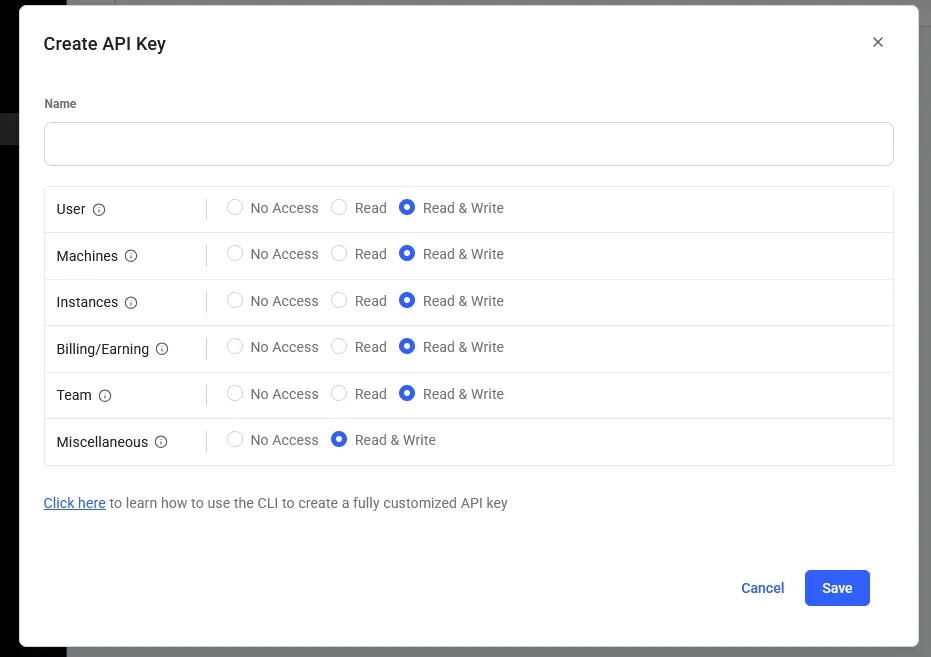 3. Give the key a descriptive name (e.g. `ci-deploy`, `local-dev`, `prod-scaler`). The name only helps you identify keys later; it isn't sent in requests.
4. Select the permissions for this key. Defaults to full access; restrict for scoped keys (see below).
3. Give the key a descriptive name (e.g. `ci-deploy`, `local-dev`, `prod-scaler`). The name only helps you identify keys later; it isn't sent in requests.
4. Select the permissions for this key. Defaults to full access; restrict for scoped keys (see below).
 5. Click **Create**. The new key is shown once. Copy it now.
Vast.ai shows the key value only at creation time. Treat it like a password: save it to your password manager, an environment variable, or a secret store. If you lose it, you'll need to [reset](#reset-a-key) the key, which generates a new value.
## Use your key
Once you've copied the key, choose how to authenticate based on which surface you're using.
Configure the CLI once; subsequent commands pick the key up automatically:
```bash theme={null}
vastai set api-key YOUR_API_KEY
```
The key is stored at `~/.config/vastai/vast_api_key`. Override per-command with the `--api-key` flag if needed.
Pass the key explicitly, or read from an env var:
```python theme={null}
from vastai import VastAI
vast = VastAI(api_key="YOUR_API_KEY")
```
```python theme={null}
import os
from vastai import VastAI
vast = VastAI(api_key=os.environ["VAST_API_KEY"])
```
If the CLI is configured on the same machine, the SDK reads the key automatically from `~/.config/vastai/vast_api_key`, no argument needed.
Send the key as a Bearer token on every request:
```bash theme={null}
curl -H "Authorization: Bearer $VAST_API_KEY" \
https://console.vast.ai/api/v0/instances/
```
## Scope a key
Default keys have full access to your account, including billing, instance creation, and key management. For automation that only needs a subset of those, create a scoped key.
Scoped keys are configured at creation time in the console (step 4 above) or via the CLI:
```bash theme={null}
vastai create api-key \
--name "ci-deploy" \
--permissions '{"manage_instances": true, "manage_billing": false}'
```
Common scoping patterns:
| Use case | Recommended scope |
| ----------------------------------------- | ------------------------------------------------------- |
| CI/CD that creates and destroys instances | Instance management only |
| Read-only monitoring or dashboards | Read-only across resources |
| A teammate's local development | Full access, per-user (so you can revoke independently) |
| Production scaler / autoscaler | Instance management only, no billing |
See the [permissions reference](/api-reference/permissions) for the full list of permission flags and their effects.
## Reset a key
If a key is compromised, lost, or you want to rotate it on a schedule:
1. Go to the [Keys page](https://cloud.vast.ai/manage-keys/).
2. Find the key in the **API Keys** section and click **Reset**.
3. A new value is generated and shown once. Copy it.
4. Update wherever the old value was stored (env vars, secret managers, CI variables).
The old key stops working as soon as you reset; there's no overlap window.
## Delete a key
To permanently revoke a key:
1. Go to the [Keys page](https://cloud.vast.ai/manage-keys/).
2. Find the key in the **API Keys** section and click **Delete**.
Deletion is immediate. Any service still using the deleted key will start receiving `401 Unauthorized` responses.
## CLI reference
If you'd rather manage keys from the command line:
| Command | What it does |
| -------------------------------------------------------- | --------------------------------------- |
| [`vastai create api-key`](/cli/reference/create-api-key) | Create a new API key, optionally scoped |
| [`vastai show api-keys`](/cli/reference/show-api-keys) | List all API keys on your account |
| [`vastai delete api-key`](/cli/reference/delete-api-key) | Delete an API key by ID |
| `vastai reset api-key` | Reset (rotate) the value of a key |
| [`vastai set api-key`](/cli/reference/set-api-key) | Save a key locally for the CLI to use |
## Security tips
* **Never commit keys to source control.** Use environment variables, GitHub Actions secrets, or a secret manager.
* **Use a separate key per environment.** Local dev, staging, and prod should each have their own key so you can revoke one without affecting the others.
* **Scope keys to the minimum permissions** they need. A leaked scoped key is much less damaging than a leaked full-access key.
* **Rotate keys periodically.** A 90-day rotation is a reasonable baseline for production keys.
* **Audit your keys.** Review the API Keys section of the console occasionally and delete any keys you no longer use or recognize.
## Related
* [SSH keys](/guides/reference/keys#ssh-keys), used to connect to instances (separate from API keys).
* [CLI authentication](/cli/authentication), how the CLI uses your API key.
* [API authentication & permissions](/api-reference/authentication), the deep-dive on auth.
5. Click **Create**. The new key is shown once. Copy it now.
Vast.ai shows the key value only at creation time. Treat it like a password: save it to your password manager, an environment variable, or a secret store. If you lose it, you'll need to [reset](#reset-a-key) the key, which generates a new value.
## Use your key
Once you've copied the key, choose how to authenticate based on which surface you're using.
Configure the CLI once; subsequent commands pick the key up automatically:
```bash theme={null}
vastai set api-key YOUR_API_KEY
```
The key is stored at `~/.config/vastai/vast_api_key`. Override per-command with the `--api-key` flag if needed.
Pass the key explicitly, or read from an env var:
```python theme={null}
from vastai import VastAI
vast = VastAI(api_key="YOUR_API_KEY")
```
```python theme={null}
import os
from vastai import VastAI
vast = VastAI(api_key=os.environ["VAST_API_KEY"])
```
If the CLI is configured on the same machine, the SDK reads the key automatically from `~/.config/vastai/vast_api_key`, no argument needed.
Send the key as a Bearer token on every request:
```bash theme={null}
curl -H "Authorization: Bearer $VAST_API_KEY" \
https://console.vast.ai/api/v0/instances/
```
## Scope a key
Default keys have full access to your account, including billing, instance creation, and key management. For automation that only needs a subset of those, create a scoped key.
Scoped keys are configured at creation time in the console (step 4 above) or via the CLI:
```bash theme={null}
vastai create api-key \
--name "ci-deploy" \
--permissions '{"manage_instances": true, "manage_billing": false}'
```
Common scoping patterns:
| Use case | Recommended scope |
| ----------------------------------------- | ------------------------------------------------------- |
| CI/CD that creates and destroys instances | Instance management only |
| Read-only monitoring or dashboards | Read-only across resources |
| A teammate's local development | Full access, per-user (so you can revoke independently) |
| Production scaler / autoscaler | Instance management only, no billing |
See the [permissions reference](/api-reference/permissions) for the full list of permission flags and their effects.
## Reset a key
If a key is compromised, lost, or you want to rotate it on a schedule:
1. Go to the [Keys page](https://cloud.vast.ai/manage-keys/).
2. Find the key in the **API Keys** section and click **Reset**.
3. A new value is generated and shown once. Copy it.
4. Update wherever the old value was stored (env vars, secret managers, CI variables).
The old key stops working as soon as you reset; there's no overlap window.
## Delete a key
To permanently revoke a key:
1. Go to the [Keys page](https://cloud.vast.ai/manage-keys/).
2. Find the key in the **API Keys** section and click **Delete**.
Deletion is immediate. Any service still using the deleted key will start receiving `401 Unauthorized` responses.
## CLI reference
If you'd rather manage keys from the command line:
| Command | What it does |
| -------------------------------------------------------- | --------------------------------------- |
| [`vastai create api-key`](/cli/reference/create-api-key) | Create a new API key, optionally scoped |
| [`vastai show api-keys`](/cli/reference/show-api-keys) | List all API keys on your account |
| [`vastai delete api-key`](/cli/reference/delete-api-key) | Delete an API key by ID |
| `vastai reset api-key` | Reset (rotate) the value of a key |
| [`vastai set api-key`](/cli/reference/set-api-key) | Save a key locally for the CLI to use |
## Security tips
* **Never commit keys to source control.** Use environment variables, GitHub Actions secrets, or a secret manager.
* **Use a separate key per environment.** Local dev, staging, and prod should each have their own key so you can revoke one without affecting the others.
* **Scope keys to the minimum permissions** they need. A leaked scoped key is much less damaging than a leaked full-access key.
* **Rotate keys periodically.** A 90-day rotation is a reasonable baseline for production keys.
* **Audit your keys.** Review the API Keys section of the console occasionally and delete any keys you no longer use or recognize.
## Related
* [SSH keys](/guides/reference/keys#ssh-keys), used to connect to instances (separate from API keys).
* [CLI authentication](/cli/authentication), how the CLI uses your API key.
* [API authentication & permissions](/api-reference/authentication), the deep-dive on auth.