> ## Documentation Index
> Fetch the complete documentation index at: https://docs.vast.ai/llms.txt
> Use this file to discover all available pages before exploring further.
# Notification Webhooks
> Send Vast.ai notification events to your own HTTPS endpoint for automation, monitoring, and audit workflows.
Notification webhooks deliver Vast.ai notification events to an HTTPS endpoint you operate. They are grouped under the notification system because they use the same notification types and preferences as email notifications.
Use webhooks when a notification should become an action: update your dashboard when an instance starts, pause automation when a low-balance event fires, or trigger cleanup when an instance is outbid. The same mechanics apply to host events — see [Host Notifications](/host/notifications).
## How Webhooks Fit Into Notifications
A webhook subscribes to one or more notification type keys. When a matching event is produced and the webhook channel is enabled for that notification type, Vast.ai sends a signed `POST` request to your webhook URL.
Subscribing a webhook to an event automatically turns on the webhook channel for that event in your notification preferences.
## Create a Webhook in the Console
1. Open [Account Settings](https://cloud.vast.ai/account/).
2. Go to **Notification Settings**.
3. Select the notification events you want to send to a webhook.
4. Click **Create webhook**.
5. Enter a webhook name and an HTTPS URL.
6. Click **Create**, then click **Save** on the notification settings form.
Existing webhooks appear below the notification groups. You can edit the name or URL, delete the webhook, or unsubscribe the webhook from an individual event.
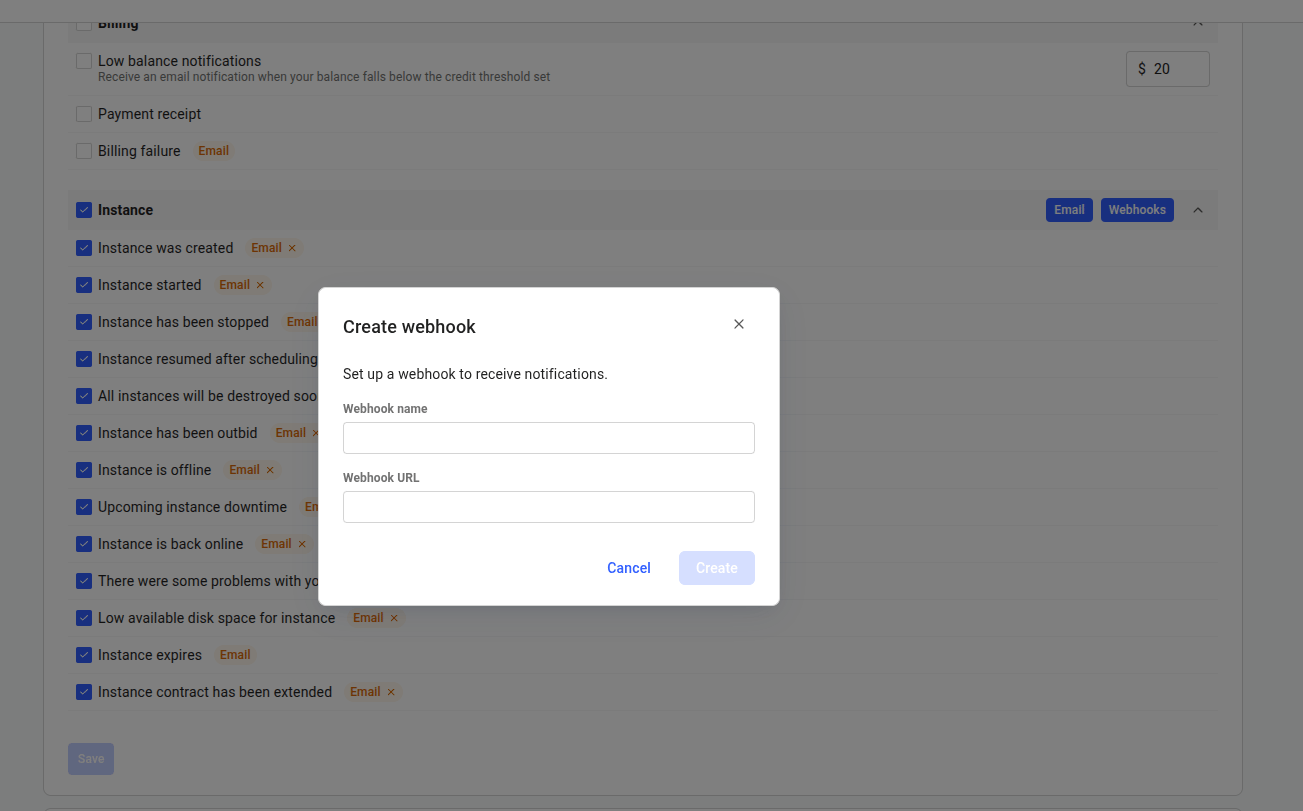 Webhook changes are saved when you save the notification settings form. If you close the page before saving, the form changes are not persisted.
## Manage Webhooks With the API
This guide covers the delivery behavior you need to integrate safely — signing, retries, limits, and the receiver pattern. The API calls themselves (request bodies, response schemas, status codes) are documented in the API reference:
| Task | API reference |
| -------------------------------- | ----------------------------------------------------------------------------------------------------- |
| Discover subscribable event keys | [List notification types](/api-reference/notifications/list-notification-types) |
| Create a webhook | [Create notification webhook](/api-reference/notifications/create-notification-webhook) |
| List your webhooks | [List notification webhooks](/api-reference/notifications/list-notification-webhooks) |
| Update a webhook | [Update notification webhook](/api-reference/notifications/update-notification-webhook) |
| Delete a webhook | [Delete notification webhook](/api-reference/notifications/delete-notification-webhook) |
| Rotate the signing secret | [Rotate notification webhook secret](/api-reference/notifications/rotate-notification-webhook-secret) |
| Send a test delivery | [Test notification webhook](/api-reference/notifications/test-notification-webhook) |
The signing secret is returned only when a webhook is created and when the secret is rotated — not on list or update responses. Store it immediately.
The test endpoint sends a `webhook_test` event with the same request format and signature headers as a real delivery. It is not retried.
## Webhook Limits and Validation
| Rule | Details |
| ---------------- | -------------------------------------------------------------------------------------------------------- |
| Maximum webhooks | 4 per user |
| URL scheme | `https://` only when creating or updating a webhook |
| URL length | 2048 characters maximum |
| Endpoint host | Must include a hostname |
| Delivery target | Must resolve to a public IP address; localhost and private network targets are rejected at delivery time |
| Redirects | Redirect responses are treated as permanent delivery failures |
| Name | Optional through the API, 120 characters maximum, no control characters |
| Events | `event_types` must contain at least one valid event key |
Use full notification type keys such as `client:low_credit` and `client:outbid`. Because a similar event can exist for both renters and hosts, the full key — including its `client:` or `host:` prefix — avoids ambiguity. Host webhooks use `host:` keys, documented in [Host Notifications](/host/notifications).
## Event Payload
Vast.ai sends a JSON `POST` request:
```json theme={null}
{
"event_id": "7e9a2c4e6f9e4a24a53b77c2d8e3f0aa",
"user_id": 123,
"notif_type": "low_credit",
"subject": "Warning - Your Vast.ai Credit Balance Is Getting Low",
"message": "Your Vast.ai balance is below your configured threshold.",
"timestamp": 1772490000.123
}
```
The payload's `notif_type` is the short slug (for example `low_credit`), without the `client:` or `host:` context prefix used in subscription keys. If you subscribe one webhook to both a `client:` and a `host:` variant of the same event, use a dedicated webhook per context to tell them apart reliably.
Headers:
| Header | Description |
| -------------------------------- | ---------------------------------------------------- |
| `Content-Type: application/json` | Payload format |
| `X-Vast-Event-Id` | Stable event ID. Use this to deduplicate retries. |
| `X-Vast-Delivery-Attempt` | 1 for the first attempt, then increments on retries. |
| `X-Vast-Timestamp` | Integer Unix timestamp used in the signature input. |
| `X-Vast-Signature-256` | `sha256=` plus the HMAC-SHA256 signature. |
The payload's `timestamp` remains a floating-point event timestamp. Signature verification uses the integer timestamp from `X-Vast-Timestamp`.
## Verify Signatures
Verify every request before acting on it. Vast.ai signs the exact request body with your `webhook_secret`.
The signature input is:
```text theme={null}
.
```
Python example:
```python theme={null}
import hmac
import hashlib
import time
def verify_vast_signature(headers, raw_body: bytes, webhook_secret: str) -> bool:
timestamp = headers.get("X-Vast-Timestamp", "")
signature = headers.get("X-Vast-Signature-256", "")
if not timestamp or not signature.startswith("sha256="):
return False
# Reject old requests to reduce replay risk.
try:
age = abs(time.time() - int(timestamp))
except ValueError:
return False
if age > 300:
return False
signed = timestamp.encode("utf-8") + b"." + raw_body
expected = hmac.new(
webhook_secret.encode("utf-8"),
signed,
hashlib.sha256,
).hexdigest()
return hmac.compare_digest(signature, f"sha256={expected}")
```
Do not parse and re-serialize JSON before verification. Use the raw request body bytes exactly as received.
## Retry Behavior
Return a `2xx` status only once you have safely accepted the event — that is, verified the signature and enqueued it.
| Your response | Vast.ai behavior |
| ---------------------------------- | --------------------------------------------- |
| `2xx` | Delivery is successful |
| `3xx` | Permanent failure; redirects are not followed |
| `400`-`499` except `408` and `429` | Permanent failure |
| `408`, `429`, or `5xx` | Retryable failure |
| Timeout or connection error | Retryable failure |
Webhook delivery uses a 10 second request timeout. Design receivers to do minimal work in the request path: verify the signature, enqueue the event, return `2xx`, then process asynchronously.
Webhook delivery is at-least-once. Store `event_id` and ignore duplicates before triggering side effects.
## Recommended Receiver Pattern
1. Require `POST`.
2. Read the raw request body.
3. Verify `X-Vast-Signature-256`.
4. Reject stale timestamps.
5. Deduplicate by `event_id`.
6. Enqueue the event in your own system.
7. Return `204` or another `2xx` response quickly.
This keeps the Vast.ai delivery path fast and gives your system control over downstream retries, paging, and processing.
Webhook changes are saved when you save the notification settings form. If you close the page before saving, the form changes are not persisted.
## Manage Webhooks With the API
This guide covers the delivery behavior you need to integrate safely — signing, retries, limits, and the receiver pattern. The API calls themselves (request bodies, response schemas, status codes) are documented in the API reference:
| Task | API reference |
| -------------------------------- | ----------------------------------------------------------------------------------------------------- |
| Discover subscribable event keys | [List notification types](/api-reference/notifications/list-notification-types) |
| Create a webhook | [Create notification webhook](/api-reference/notifications/create-notification-webhook) |
| List your webhooks | [List notification webhooks](/api-reference/notifications/list-notification-webhooks) |
| Update a webhook | [Update notification webhook](/api-reference/notifications/update-notification-webhook) |
| Delete a webhook | [Delete notification webhook](/api-reference/notifications/delete-notification-webhook) |
| Rotate the signing secret | [Rotate notification webhook secret](/api-reference/notifications/rotate-notification-webhook-secret) |
| Send a test delivery | [Test notification webhook](/api-reference/notifications/test-notification-webhook) |
The signing secret is returned only when a webhook is created and when the secret is rotated — not on list or update responses. Store it immediately.
The test endpoint sends a `webhook_test` event with the same request format and signature headers as a real delivery. It is not retried.
## Webhook Limits and Validation
| Rule | Details |
| ---------------- | -------------------------------------------------------------------------------------------------------- |
| Maximum webhooks | 4 per user |
| URL scheme | `https://` only when creating or updating a webhook |
| URL length | 2048 characters maximum |
| Endpoint host | Must include a hostname |
| Delivery target | Must resolve to a public IP address; localhost and private network targets are rejected at delivery time |
| Redirects | Redirect responses are treated as permanent delivery failures |
| Name | Optional through the API, 120 characters maximum, no control characters |
| Events | `event_types` must contain at least one valid event key |
Use full notification type keys such as `client:low_credit` and `client:outbid`. Because a similar event can exist for both renters and hosts, the full key — including its `client:` or `host:` prefix — avoids ambiguity. Host webhooks use `host:` keys, documented in [Host Notifications](/host/notifications).
## Event Payload
Vast.ai sends a JSON `POST` request:
```json theme={null}
{
"event_id": "7e9a2c4e6f9e4a24a53b77c2d8e3f0aa",
"user_id": 123,
"notif_type": "low_credit",
"subject": "Warning - Your Vast.ai Credit Balance Is Getting Low",
"message": "Your Vast.ai balance is below your configured threshold.",
"timestamp": 1772490000.123
}
```
The payload's `notif_type` is the short slug (for example `low_credit`), without the `client:` or `host:` context prefix used in subscription keys. If you subscribe one webhook to both a `client:` and a `host:` variant of the same event, use a dedicated webhook per context to tell them apart reliably.
Headers:
| Header | Description |
| -------------------------------- | ---------------------------------------------------- |
| `Content-Type: application/json` | Payload format |
| `X-Vast-Event-Id` | Stable event ID. Use this to deduplicate retries. |
| `X-Vast-Delivery-Attempt` | 1 for the first attempt, then increments on retries. |
| `X-Vast-Timestamp` | Integer Unix timestamp used in the signature input. |
| `X-Vast-Signature-256` | `sha256=` plus the HMAC-SHA256 signature. |
The payload's `timestamp` remains a floating-point event timestamp. Signature verification uses the integer timestamp from `X-Vast-Timestamp`.
## Verify Signatures
Verify every request before acting on it. Vast.ai signs the exact request body with your `webhook_secret`.
The signature input is:
```text theme={null}
.
```
Python example:
```python theme={null}
import hmac
import hashlib
import time
def verify_vast_signature(headers, raw_body: bytes, webhook_secret: str) -> bool:
timestamp = headers.get("X-Vast-Timestamp", "")
signature = headers.get("X-Vast-Signature-256", "")
if not timestamp or not signature.startswith("sha256="):
return False
# Reject old requests to reduce replay risk.
try:
age = abs(time.time() - int(timestamp))
except ValueError:
return False
if age > 300:
return False
signed = timestamp.encode("utf-8") + b"." + raw_body
expected = hmac.new(
webhook_secret.encode("utf-8"),
signed,
hashlib.sha256,
).hexdigest()
return hmac.compare_digest(signature, f"sha256={expected}")
```
Do not parse and re-serialize JSON before verification. Use the raw request body bytes exactly as received.
## Retry Behavior
Return a `2xx` status only once you have safely accepted the event — that is, verified the signature and enqueued it.
| Your response | Vast.ai behavior |
| ---------------------------------- | --------------------------------------------- |
| `2xx` | Delivery is successful |
| `3xx` | Permanent failure; redirects are not followed |
| `400`-`499` except `408` and `429` | Permanent failure |
| `408`, `429`, or `5xx` | Retryable failure |
| Timeout or connection error | Retryable failure |
Webhook delivery uses a 10 second request timeout. Design receivers to do minimal work in the request path: verify the signature, enqueue the event, return `2xx`, then process asynchronously.
Webhook delivery is at-least-once. Store `event_id` and ignore duplicates before triggering side effects.
## Recommended Receiver Pattern
1. Require `POST`.
2. Read the raw request body.
3. Verify `X-Vast-Signature-256`.
4. Reject stale timestamps.
5. Deduplicate by `event_id`.
6. Enqueue the event in your own system.
7. Return `204` or another `2xx` response quickly.
This keeps the Vast.ai delivery path fast and gives your system control over downstream retries, paging, and processing.